# Nervix for MacOS 下载与使用

### 1. 系统要求

* 支持 **MacOS 10 及以上版本**

### 2. **Nervix**客户端下载（新客户端）

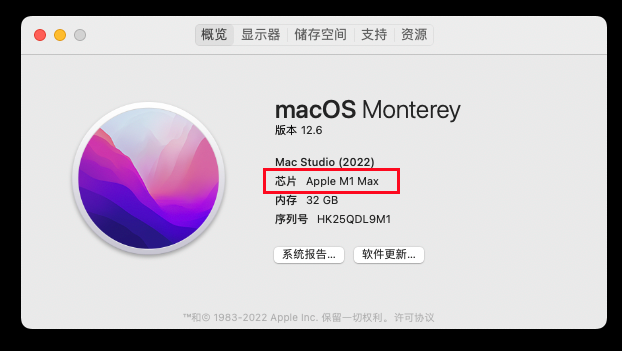
#### 如何查看mac是什么芯片

1. 鼠标点击屏幕左上角 **🍎 Apple 标志**
2. 点击 **「关于本机」**
3. 如果显示为 M1，2，3，4 芯片，则下载下方的M芯安装包，
4. 如果显示为 Intel，则下载intel芯片的安装包

<figure><img src="/files/EB6Lfho0Iax0Ig2puEcz" alt="" width="467"><figcaption><p>请确认您的电脑是什么芯片</p></figcaption></figure>

{% hint style="success" %}

* [intel芯片 客户端下载](https://wwet.lanzoup.com/iG2vM2wy9cni) (免登录网盘，直接下载，见下图)
* [M芯 客户端下载 ](https://wwet.lanzoup.com/i0odj2wxyo2d)(免登录网盘，直接下载，见下图)
* [Intel芯片下载地址02](https://vault.digitalage.services/index.php/s/gcCgQ8Pa6K7S8M8)
* [M芯下载地址02](https://vault.digitalage.services/index.php/s/bzTCFbqdNSsNeEn)
  {% endhint %}

{% hint style="danger" %}
如果安装的过程，系统提示不安全，无法打开，等情况，我们需要打开一个开启所有来源的开关，具体看教程👉 [Mac OS 开启 「任何来源」 安装权限教程](/chang-jian-wen-ti/mac-os-kai-qi-ren-he-lai-yuan-an-zhuang-quan-xian-jiao-cheng.md)
{% endhint %}

### 3. 安装说明

{% hint style="danger" %}
如果出现无法运行的提示，请按以下步骤操作：

1. 点击左上角 **苹果图标**
2. 打开 **系统设置 → 隐私与安全**
3. 下滑至页面底部，在安装提示处看到  **熊猫云村** 点击 **允许**
   {% endhint %}

* 打开 **应用程序**
* 找到 **熊猫云村 App** 并点击运行

### 4. 登录界面

1. 打开客户端，输入您在 **熊猫云村（Nervix）注册的邮箱与密码**进行登录。

<figure><img src="/files/MCKfI7rMc5goQ6RxlJlX" alt="" width="563"><figcaption></figcaption></figure>

1. 登录成功后，点击切换可以跳转选择节点界面。

<figure><img src="/files/81TblHeCEj3dgkF1RzAs" alt="" width="563"><figcaption></figcaption></figure>

### 5.选择节点

* 登录成功后，点击 **切换** 进入节点选择界面
* 根据自身需求，手动选择合适的节点

<figure><img src="/files/Up01xMjfrUsCqVUCQaqo" alt="" width="563"><figcaption></figcaption></figure>

### 6. 连接享受

1. 点击 **连接按钮**
2. 等待连接成功提示

<figure><img src="/files/cZN7Ar0lSDr2eEGw8ZPx" alt="" width="563"><figcaption></figcaption></figure>

### 7. 测试连接

连接后，可以打开 [www.youtube.com](http://www.youtube.com/) 测试一下，如果油管可以打开就说明已经成功


---

# Agent Instructions: Querying This Documentation

If you need additional information that is not directly available in this page, you can query the documentation dynamically by asking a question.

Perform an HTTP GET request on the current page URL with the `ask` query parameter:

```
GET https://doc.tabnet.us/mac/tabnet-for-macos-xia-zai-yu-shi-yong.md?ask=<question>
```

The question should be specific, self-contained, and written in natural language.
The response will contain a direct answer to the question and relevant excerpts and sources from the documentation.

Use this mechanism when the answer is not explicitly present in the current page, you need clarification or additional context, or you want to retrieve related documentation sections.